
Spotify Made for You: Find Mixes and Weekly Playlists
Spotify Made for You is the hub for personalized playlists built from what you play, save, skip, and share. Spotify groups Discover Weekly, Release Radar, Daylist, On Repeat, Daily Mixes, and more under that label. This guide follows Spotify’s find-playlists and Mixes help so you can open Made for You on Home or Search, know how often each list refreshes, and train better recommendations without third-party âhackâ tools.
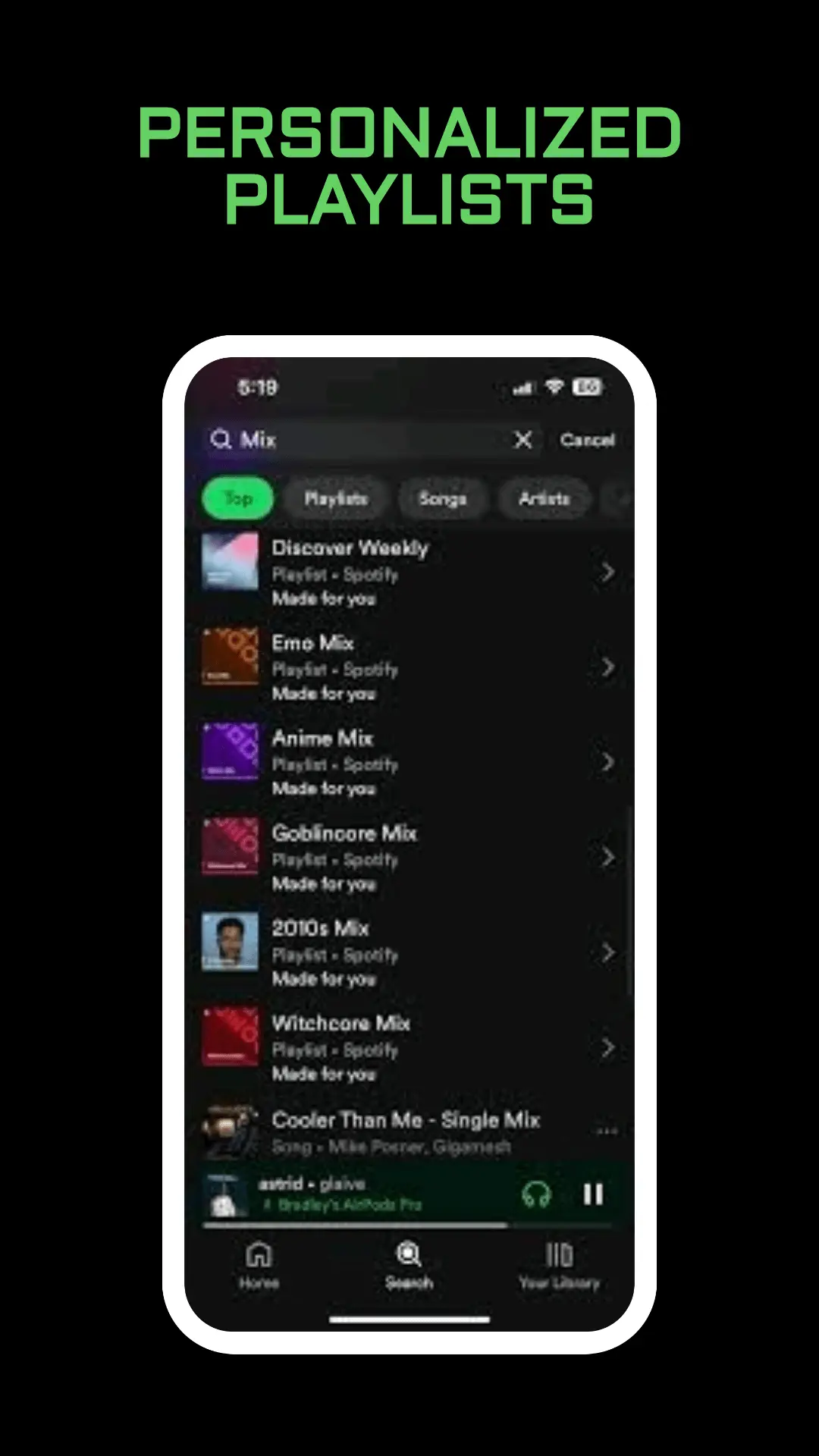
Where to Find Made for You
Spotify says Made for You playlists sit on Home, under Made for You in Search, or by searching a playlist name. New accounts need a few weeks of listening before personalized shelves fill in. If Home looks empty, play artists you like, heart tracks into Liked Songs, and follow shows you care about so the model has signal.
Search is often faster when you want one list by name. Type Discover Weekly, Release Radar, or Daylist and open the Made for You result. Longer walkthroughs for those staples are in Spotify Discover Weekly, Spotify Release Radar, and Spotify Daylist.
Saved Made for You lists also appear among Library playlists after you engage with them. Library filters and pins help you keep Discover Weekly near the top; see Spotify Your Library.
Which Playlists Count as Made for You
Spotify’s find-playlists table lists the core set and update cadence:
- Spotify Mixes (artist, mood, decade, genre, niche): update more often the more you listen.
- Discover Weekly: songs Spotify thinks you will love, every Monday.
- Release Radar: new releases matched to you, every Friday.
- On Repeat and Repeat Rewind: recent favorites and older repeats, about every five days.
- Your Daily Podcasts: podcast episodes matched to you, updating with listening.
- Daylist: a changing daytime soundtrack, refreshing through the day as you listen.
Daily Mixes live inside Mixes and blend regular listens with recommendations. Artist Mixes lean toward one act; Mood, Decade, and Genre Mixes narrow the lane. Details and browse paths are in Spotify Daily Mix. On Repeat habits are covered in Spotify On Repeat.
DJ and Smart Shuffle are personalized in other ways. DJ is a separate radio-style host experience; see Spotify DJ. Blend is a shared social playlist that also sits near Made for You workflows when you invite friends; setup is in Spotify Blend.
How to Improve Your Made for You Results
Spotify builds these lists from listening habits and from people with similar taste. Clear signals help:
- Play full tracks you enjoy instead of skipping in the first seconds.
- Save albums and songs you want more of; remove saves you outgrew.
- Follow artists and podcasts you care about so Release Radar and Daily Podcasts stay relevant. Follow steps are in Spotify follow.
- Use Private Session when a shared listen should not bend your taste profile; see Spotify private session.
Liked Songs remains a strong training set for Mixes and Discover Weekly. Heart and un-heart hygiene is in Spotify liked songs. Your own playlists still matter for taste; creation tips are in Spotify playlist.
Podcast shelves in Made for You improve when you finish episodes and follow shows. Podcast find and download habits are in Spotify podcasts. Sharing a Made for You playlist uses the normal share sheet in Spotify share.
Made for Everyone vs Made by Everyone
Spotify also labels editorial “made for everyone” lists in Search. Some of those still personalize track order based on your history, so your Sing-Along Hits may differ from a friend’s. Listener-made playlists are a third bucket: search keywords, open friend profiles, or browse artist profiles. None of those replace Made for You, but they fill gaps when you want human curation.
If a personalized shelf stalls after a long break, listen normally for several days before expecting Discover Weekly or Mixes to feel current again. Clearing cache will not rebuild taste; it only frees temporary files, as in Spotify clear cache.
When friends ask what you play, share a Made for You card carefully if you prefer privacy. Listening activity settings control what others see in real time, while Wrapped-style year recaps are a separate seasonal product. For day-to-day taste training, stick to honest plays on your own account rather than borrowing someone else’s login.
Frequently Asked Questions
Where is Made for You in the Spotify app?
Open Home for the shelf, or go to Search and select Made for You. You can also search a playlist name such as Discover Weekly.
Why is my Made for You section empty?
New accounts need a few weeks of listening. Play, save, and follow music you like so Spotify has enough history.
How often does Discover Weekly update?
Spotify refreshes Discover Weekly every Monday. Release Radar updates every Friday. Mixes update more often as you listen.
Final Thoughts
Spotify Made for You is the home for algorithm playlists that track your taste across the week. Open it from Home or Search, learn each list’s refresh rhythm, and train it with intentional plays, saves, and follows. Official find-playlists and Mixes pages stay the reference when a shelf looks stale or missing.