
Spotify Share: Links, Codes, and Playlist Profile
Spotify share sends a song, album, artist, playlist, podcast, or profile out of the app as a link, a social post, an embed, or a Spotify Code. The same menu also controls whether a playlist sits on your public profile. This guide follows Spotify’s share and playlist publishing pages so you can pass a track to a friend without guessing which Share option does what.
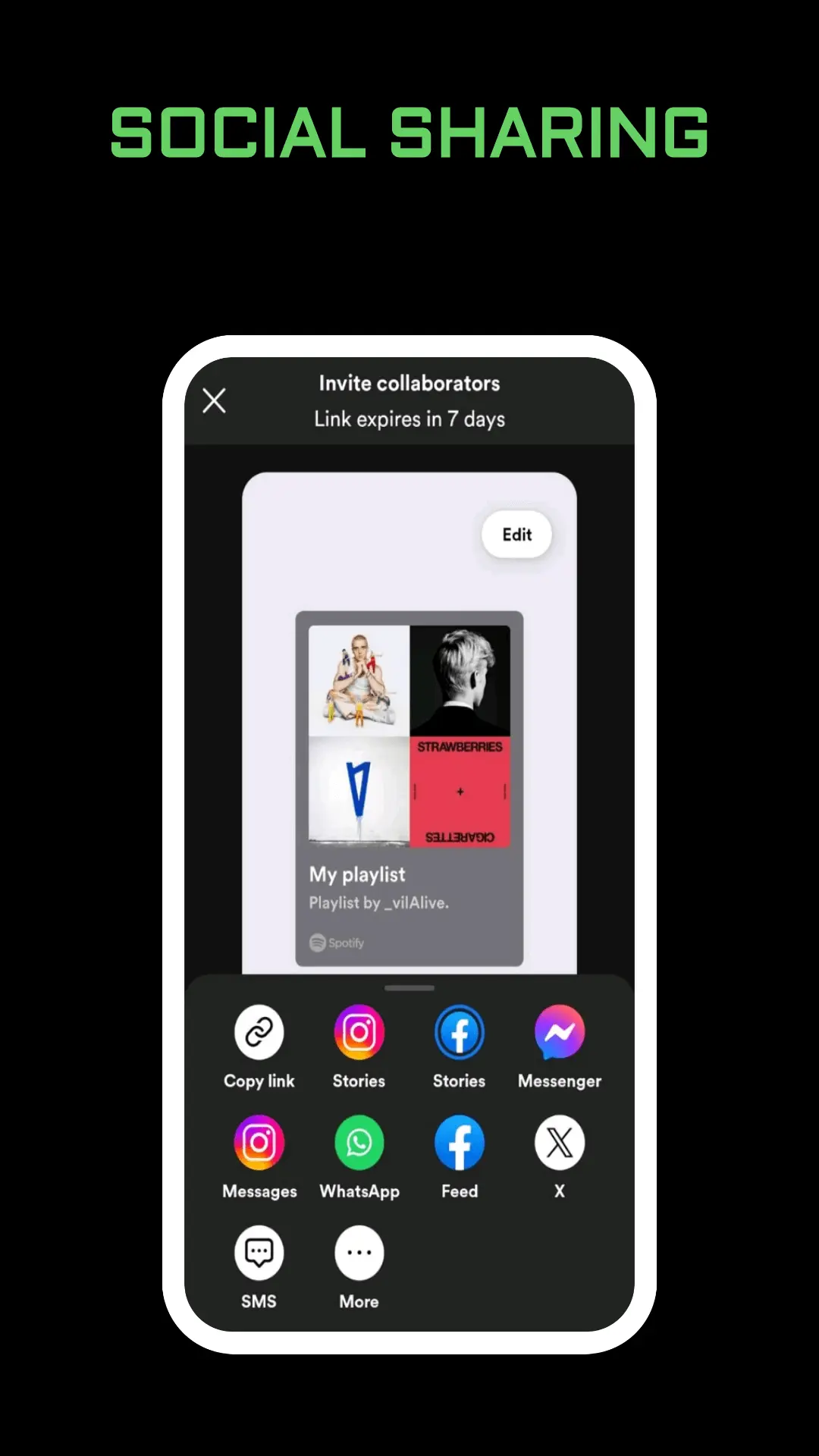
How Spotify Share Works on Mobile and Desktop
Spotify says you can share songs, albums, artists, playlists, podcasts, and your profile from the app. On a phone or tablet:
- Open the item you want to send.
- Tap the three-dot menu on iOS or Android.
- Choose Share.
From there you can send the item to a social or messaging app, copy a link, or use a Spotify Code. On desktop, right-click the item or open the menu next to it, then choose Share. Desktop Share offers Copy Link or Copy embed code. Hold Alt on Windows or Option on Mac if you need the Spotify URI for tools that still ask for it.
A copied link opens the track or list in Spotify for whoever receives it. An embed code drops a player into a page that allows Spotify embeds. Neither option downloads the file. Offline listening for your own account stays in Spotify offline.
Spotify Codes are a visual share. Tap the menu on the content, then Show Spotify Code. A friend scans that pattern with a phone camera. You can also screenshot the code. For a high-resolution version, Spotify points you to spotifycodes.com. Scanning on mobile:
- Tap Search.
- Tap the search bar.
- Tap the camera.
- Tap SCAN.
- Point the camera at the code.
Spotify needs camera access for that scan. The longer Code walkthrough on this site is in Spotify code. Canvas and other shareable art are separate from a plain link; Canvas basics live in Spotify Canvas.
Playlists, Profile Publishing, and Private Links
Sharing a playlist is not the same as publishing it on your profile. Spotify lets you Add to profile or Remove from profile from the playlist menu on mobile, or with a right-click on desktop and the web player. Only public playlists appear on the profile, and new playlists publish by default.
To stop new lists from landing on your profile automatically:
- Mobile: profile picture, Settings and privacy, Privacy and social, then turn Public playlists off under Playlist visibility.
- Desktop: profile picture, Settings, then under Social turn Publish my new playlists on my profile off.
Playlists that stay off the profile can still be shared. Recipients can play, follow, and share them. Followers of that playlist can show it on their own profiles. If the list is collaborative, anyone who receives edit access can change it. Collaborative invites are covered in Spotify collaborative playlist. Building and organizing lists is in Spotify playlist.
Private playlist share on mobile uses the same Share path: open the menu, choose Share, then send to an app or copy a link. Spotify says each shared private link works for seven days. After that window, send a fresh link. Who liked a public list is a different view, described in how to see who liked your Spotify playlist.
What Spotify Share Does Not Do
Share does not replace listening activity or Private Session. Friends who already follow your activity still see what you play unless those privacy switches change. Pair Share with Spotify listening activity and Spotify private session when you want a quiet listen after you send a link.
Share also does not unlock Premium for the recipient. A Free friend who opens your link still follows Free rules for skips and offline. Discord Listen Along and Jam are other social tools; Discord status is in Spotify Discord, and Jam steps are in how to use Spotify Jam.
If a shared link fails, confirm the sender copied the current item, the recipient is signed in, and the private playlist link is still inside its seven-day window. Re-share from the menu rather than forwarding an old chat attachment that may point at a deleted list.
Frequently Asked Questions
Where is Spotify share in the app?
Open the song, album, artist, playlist, podcast, or profile, tap or click the menu, then choose Share. Mobile offers apps, a copied link, and a Spotify Code. Desktop offers Copy Link and Copy embed code.
Does sharing put a playlist on my profile?
No. Use Add to profile or Remove from profile for that. Public playlists publish by default unless you turn that Social setting off.
How long does a private playlist link last?
Spotify says friends can use each shared private playlist link for seven days. Send a new one after that.
Final Thoughts
Spotify share is the menu path that turns what you hear into a link, embed, social send, or Code. Keep profile publishing separate from a one-off share, watch the seven-day private link window, and use Codes when you want a scan instead of a URL. Official Share and playlist publishing pages stay the checklist when a menu label moves.
