
Spotify Offline Mode: Play Downloads Only on Purpose
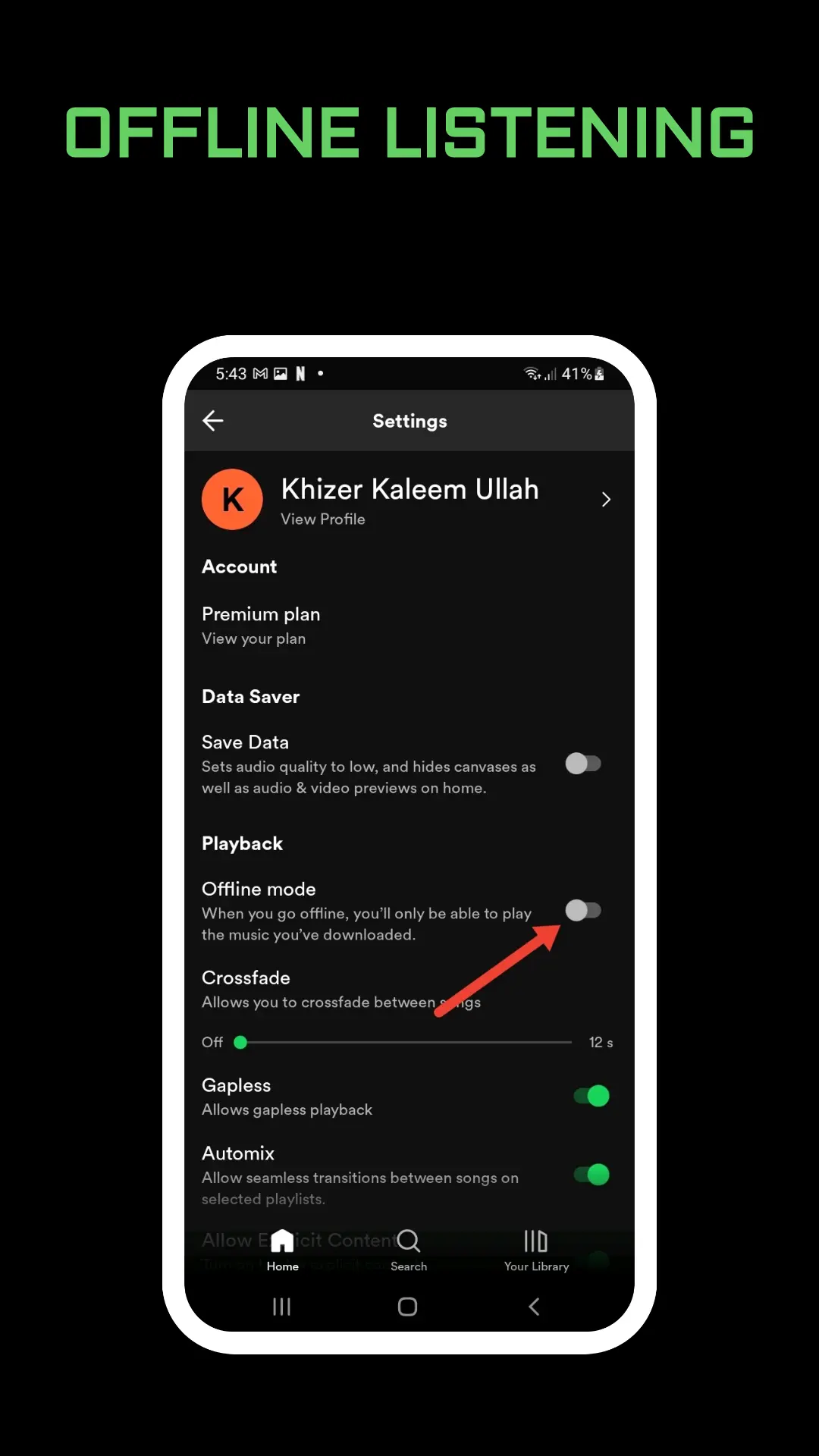
Spotify Offline Mode forces the app to play only downloaded music and podcasts so undownloaded items stay greyed out. Spotify’s listen offline help says downloads play automatically when the internet drops, but Offline Mode is the switch that locks you to local files on purpose—useful on planes, weak cellular, or when you want zero surprise streaming. This guide follows that official toggle on mobile and desktop, plus what to do when the library looks empty or you cannot turn Offline Mode off.
Offline Mode vs Downloads vs Offline Backup
Downloads are files you chose under Premium (or podcasts on Free). Offline Mode is a setting that hides everything else. Offline Backup is a separate Premium cache playlist of recent listening—it is not the same as Offline Mode. Build downloads first, then flip Offline Mode when you need a hard offline-only session. Full download steps are in Spotify offline, cache backup in Spotify Offline Backup, and device caps in Spotify download limit.
How to Turn Offline Mode On
Spotify’s mobile and tablet steps:
- Tap your profile picture.
- Open Settings and privacy.
- Tap Data-saving and offline.
- Switch Offline mode on.
On desktop: open Spotify, then Offline Mode from the Spotify menu on Mac or File on Windows. Anything not downloaded greys out. Keep at least about 1 GB free before large downloads; storage help is in Spotify storage. Pin travel playlists so they are easy to find before you enable the lock; see Spotify pin playlist and Spotify Your Library.

When Offline Mode Blocks You Online
If Spotify will not stream on Wi-Fi, check whether Offline Mode is still on. Turn it off under the same Data-saving and offline menu. Spotify’s offline troubleshooting also covers Wi-Fi restarts, router restarts, restricted networks, and cellular allowance. Data Saver is separate—it lowers quality, it does not grey out the catalog; see Spotify data saver and Spotify data usage.
Downloads can vanish without Offline Mode if you skip the 30-day online check, reinstall, or exceed five download devices. Free a seat or re-download on Wi-Fi; see Spotify too many devices and Spotify remove downloads. Clear cache only when the UI is stuck; it is not a substitute for Offline Mode; see Spotify clear cache.
Travel, Cars, and Family Phones
Before a flight, download on Wi-Fi, confirm green arrows, then enable Offline Mode so the app cannot burn roaming data if signal flickers. Leave Downloads over cellular off unless you intend to use mobile data. Car trips still need downloads or Offline Backup on the phone; see Spotify in the car. Connect speakers need a controlling device with local files when Offline Mode is on; see Spotify Connect.
Family members each need Offline Mode and downloads on their own login. Shared tablets on one password mix libraries and seats; see Spotify Family plan. Web player does not replace phone Offline Mode; use the app—limits in Spotify web player.
Podcast-only Free downloads still work with Offline Mode for shows you saved. Music Offline Mode without Premium downloads will look almost empty; Premium offline rules remain in Spotify offline and podcast tips in Spotify podcasts.
After you land, turn Offline Mode off so Home, Search, and Made for You refresh. Shuffle and repeat still work on downloaded lists while the lock is on; see Spotify shuffle and Spotify repeat.
Queue and Autoplay cannot pull online recommendations while Offline Mode is active, which is exactly the point on a plane. Build the queue from downloaded playlists before you board; see Spotify queue and Spotify autoplay. If a podcast episode is grey, you never downloaded that episode—open the show on Wi-Fi and download again. Audiobook hours follow the same local-file rule when you travel; see Spotify audiobooks.
Students and Duo users still obey per-login download seats. Turning Offline Mode on does not free a device slot; removing downloads or signing out of an old phone does. Compare plans in Spotify Premium Student and Spotify Duo if you share travel tablets. After a long Offline Mode weekend, give the app a minute on Wi-Fi to reindex Home before you assume Search is broken.
Frequently Asked Questions
Do I need downloads for Offline Mode?
Yes. Offline Mode only plays what is already downloaded on that device.
Why is everything grey?
Offline Mode is on, or downloads are missing. Turn the mode off to stream, or download on Wi-Fi first.
Is Offline Mode the same as Offline Backup?
No. Offline Mode is a lock to downloads. Offline Backup is a Premium cache playlist of recent listening.
Final Thoughts
Spotify Offline Mode is the hard switch for downloaded-only listening. Download on Wi-Fi, enable the toggle under Data-saving and offline, and disable it when you are back online. Official listen offline help remains the checklist when the catalog stays grey on good Wi-Fi.